free software for you

Thursday, May 16, 2013

Windows Activator KMS Pico 5.2.1 Free Download


Heldigard KMS Pico v5.2.1 Windows Activator is a proven powerful light-weight Activator for Windows fresh install and Volume Licensing editions. KMSPico also support the activation of MS Office 2010/2013 fresh install or volume licensing product. It is an ideal tool with simple activation step to activate your Windows or Office product all at once. KMS Pico Version 5.2.1 comes up with few change log to increase performance and program reliability throughout the activation process.

Note:
- If you install a Office Retail Version after the installation of KMSpico, then run again
the shortcut KMSpico to make the conversion, because the Service installed only activate VL.

Recommendations Optional:
- Disable Microsoft Security Updates.
- Make exceptions to Directory %ProgramFiles%\KMSpico in Antivirus

Change Log:
- Add AutoPico that use Hotbird64 dll (embedded).
- Improved service.

Requirements:
- .NET 4.0 or Windows 8/2012.
- Activate: Windows Vista/7/8, Windows Server 2008/2008R2/2012, Office 2010/201


Wednesday, May 15, 2013

ඔබගේ බ්ලොග් අඩවිනියෙනුත් මුදල් උපයන්න!


හායි යාලුවනේ!

මම අද කියන්න යන්නේ Internet එකෙන් සල්ලි හම්බකරන ක්‍රමයක් ගැනයි. මේ වැඩසටහනේ නම තමයි Sinlix Advert .
 මෙම වැඩසටහන Google Adsense වගේ වැඩසටහනක්. හැබෑයි මෙකේ තියෙන විශේෂත්වය තමයි මෙය සිංහල බ්ලොග් අඩවි වලත් ක්‍රියාත්මක කිරීමට අවස්ථාව ලබා දීමයි.

ඔබට කරන්න තියෙන්නේ Sinlix Advert හි ලියාපදින්චි වී ඔවුන් ලබා දෙන html code මගින් එම දැන්වීම් ඔබගේ වෙබ් අඩවියේ හෝ බ්ලොග් අඩවියේ පළ කිරීමයි.


 ඔයාගේ වෙබ්, බ්ලොග්, මොබයිල් අඩවි ඇතුලු ඔනෑම අන්තර්ජාල අන්තර්ගයකට ගැලපෙන පරිදි ඔබ කැමති ආකාරයකටල වර්ණවත්, නම්‍යශීලී දැන්වීම් ලබාගෙන පළ කරන්න ඔබට පුලුවන්.

මෙහිදී ඔබේ බ්ලොග් අඩවියට පැමිණෙන අය ඔබගේ දැන්වීම් Click කරන ප්‍රමාණය අනුව ඔබට මුදල් හිමිවේ.

සැලකිය යුතුයි!
තමන්ගේ අඩවියේ දැන්වීම් තමන් හෝ අනුන් ලවා කරවීම තහනම්ය. එවිට ඔබගේ ගිණුම අවලංගු වීමට ඉඩ ඇත.

ඔබේ ගිණුමේ 5$ සම්පූර්ණ වූ පසු මුදල් ඔබගේ බැංකු ගිණුමට හෝ ගිණුමට ලබා ගත හැක.

Sinlix Advert හි ලියාපදින්චි වීමට පහත Register Now බට්න් එක මත Click කරන්න


Register Now බට්න් එක මත  Click කල පසු ලැබෙන වෙබ් පිටුවේ Publisher යටතේ තිබෙන Register නම් බට්න් එක Click කර Registerවෙන්න.

How To Get More Likes And Comments On Facebook


1. Post in the mornings and evenings

Several studies conducted have revealed that these are the times that people are the most likely to check their Facebook, most probably upon arrival at the office before the start of a new day or after dinner and a shower.

Of course, common sense tells you too that posting in the middle of the night is unlikely to get you far as your posts would have been pushed down the newsfeed by other posts when morning comes.

2. Comment on others’ statuses too

By regularly interacting with your friends, a bond is formed and they would be more likely to check out your pages as well as state their views on your posts. Else, some would be obliged to return the favor if you have been regularly commenting on their posts. This explains the close-knit community that bloggers form; they regularly check and comment on each other’s blogs.

3. Ask for opinions

It doesn’t have to be real-world issues like “How would the greenhouse effect affect you?” People turn to Facebook to unwind, so asking such a question is unlikely to get you your desired response. Your question could be something fun like “Should I buy that $3,000 bag or an iPad?” Simple but good enough to get some answers!

4. Stay relevant

This is targeted at those who have business fan pages. Make sure your posts are always relevant to what you do; after all, fans connected with you for a reason.

It is OK to post happenings or news once in a while but if your personal photos and Youtube videos start appearing often, then you should remind yourself of your page’s objective.

5. Post more photos

Analysis of Facebook activities have indicated that photos are the contents that garnered the most likes and comments as compared to status updates, videos and links. It is easy; just ask yourself which would grab your attention easier?

You’d need to read status updates, watch the videos and click on links, which are definitely more tedious than looking at a photo, right? Photos tend to be more interesting too, just as the saying “A picture says a thousand words”.

6. Ask people to like your contents

Sometimes, asking the obvious is the best way to get things done! After posting a short status or photo, add “Like my photo if you think I rock!”

It is amazing that you would get more likes by actually asking out loud for people to do so. You would have received at some time a request asking you to vote for a friend’s photo submitted for a contest. What did you do? You voted, right?

7. Ask for help/tips

People are bound to help a damsel (or dude) in distress if they could. People also love to show off that they know something! So the next time you can’t figure out how to get to a place or need to locate a book, just ask on Facebook if anyone can help.

8. Tease or challenge

Don’t you think you are likely to reply to a friend who posted “I did 10km in 32 minutes, can you?  ” Do you remember the time that the diamond-popping game, Bejeweled, was the craze? We could send invites to our friends challenging them to beat our score. No one likes to be challenged, so say something to taunt them!

These are the 8 simple ways how you can get more people to like and comment on your Facebook status. Whichever method you choose, remember that moderation is the key, so don’t overdo your postings, taunts, challenges and questions.

Your friends are likely to find you annoying if you ‘blast’ them with endless questions and challenges and might ‘unfriend’ you, defeating your very purpose!

Monday, May 13, 2013

If You Want To Recover Deleted Facebook Messages - 2013


Most of the Facebook users doesn’t know they can’t delete Facebook messages form the inbox with a single click. Hence we can recover previously deleted messages with few steps. So don’t worry if you have accidentally deleted a important conversation.

When you click on the little cross button against Facebook messages in your inbox, it doesn’t delete the message. What it does is move that message to Archived Section.

As following picture you can switch between Archived and other sections. Now Select Archived.


How To Check Your Antivirus Is Working Or Not Tips 2013


Now you can easily Check your Antivirus Working or not very easily .to cheack your Antivirus just use below trick
1:-Open Notepad and paste below code in it


X5O!P%@AP[4\PZX54(P^)7CC)7}$EICAR-STANDARD-ANTIVIRUS-TEST-FILE!$H+H*


2:-Save with any name but extension must be in .bat eg Antivirustest.batnot Antivirustest.txt

If your Antivirus Detect it as Virus then your Antivirus good and Working if it not detect it as Virus then it time to change your Antivirus

ENJOY...

10 Things to Avoid Doing on Facebook 2013


Facebook offers a convenient way to keep up with friends and acquaintances. Like every Internet innovation, however, it has its downside. Making a misstep can have ruinous effects on everything from your computer hardware to your friends and family. To get the most out of Facebook, educate yourself on the common mistakes every user should do his best to avoid.

Spamming

Spamming can take many forms on Facebook, and you may be guilty of it yourself without realizing it. Sending multiple game or application requests to the same people over and over, even if they're on your Facebook friends list, can annoy others, and they may report you for spamming. If you want to recommend a page, product or app, choose the few friends who might be interested. Posting the same content, such as a promotional link, to multiple fan pages or groups can also be seen as spam. If enough people report you, your Facebook access may be in danger.

Accepting Malware and Viruses

Be particularly wary of clicking Facebook links from people you don't know you can trust, especially if they promise something that sounds too good to be true. Promises of free products or exclusive access to shocking material, such as videos and pictures, are often attempts to infect your system with viruses or malware, which could have negative effects such as damaging your computer or spamming your friends. Requests to download or install something to gain access to content is one giveaway of malicious intent.

Oversharing

Oversharing is when you divulge too much personal information. In real life, you might confide in your mom that the chili you ate last night gave you diarrhea, but it's probably not something everyone else on your friends list wants to know. At worst, a misjudged Facebook rant can cost you your job. You can always share details of your sex life, bathroom troubles and domestic arguments with a few select friends, via private message.

Making Private Information Public

This applies to confidential information such as your address and phone number. You're unlikely to share this sort of data in a status update, but you may unwittingly share it publicly if you haven't checked your privacy settings. Click "Account," then "Privacy Settings" to determine how much others can see. Even sharing your birthday publicly can be an open invitation to identity thieves.

Giving the Game Away

Remember that what you post to Facebook is visible to everyone on your friends list. If you phone in sick to work and then update your status to inform everyone you're spending the day at the beach, word could get back to your employer. Likewise, you could find yourself in trouble making an excuse to duck out of a party invite only to announce via Facebook that you're actually sat at home watching TV.

Status Updates

If you have a bone to pick with a friend, say what you have to say to her face. Posting "Some people are just jealous" as a status update and hoping the offending person will get the message is immature, not to mention annoying to those who don't have a clue what you're talking about. Many will see it as attention-seeking behavior.

Becoming Addicted

Anything can become an addiction if you devote too much time and energy to it at the expense of all else. Clinical psychologist Dr. Michael Fenichel has suggested that "Facebook Addiction Disorder" is an increasing reality for some users. Balance your online life with other pursuits; read a book, pick up the phone to talk to a friend or arrange a real-life coffee date. Social networking has many benefits, but as in everything in life, balance is the key to health and happiness.

Scan Your Facebook Profile Using Your Virus Guards 2013


Scan Your Facebook Account:


We use antivirus to find virus,trojans,malwares,worms etc. Similarly there are some apps in facebook which are designed by leading antivirus companies .
These apps will scan your complete profile i.e your time line and in some cases also your friends time line , below are the collection of such apps:

BITDEFENDER SAEGO:


Bitdefender Safego protects your Facebook account from all sorts of e-trouble: scams, spam, malware and private data exposure. Safego also keeps your friends safe.
Safego also keeps your online friends safe and ...close.


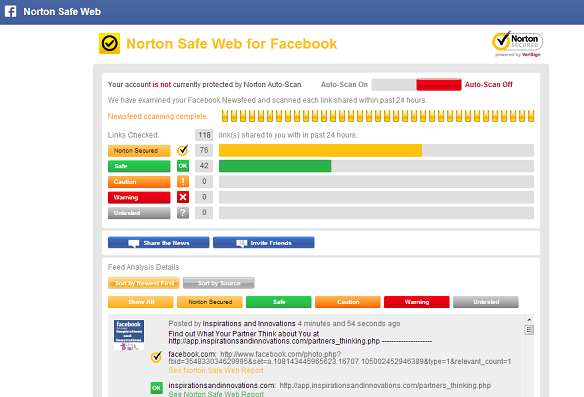
NORTON SAFEWEB FOR FACEBOOK


Safeguard against malicious URLs by scanning your feed using Norton Safe Web. Protect your friends by advising them of malicious URLs you might have in your feed.

2


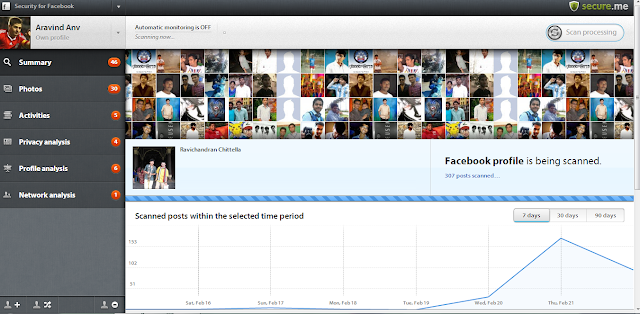
SECURE.ME(ANTIVRUS OF FACEBOOK)


4


secure.me works like antivirus for social networks and apps. Using sophisticated algorithms, we identify posts and photos that pose a threat to your privacy, security and reputation. In addition to your own Facebook profile, we also monitor your friends network to keep you safe and secure.


How to Secure Your WiFi Connection 2013


In this Post i am going to tell how you can secure your PC WiFi Connection in some simple steps.we all know that security of our WiFi Connection is how Important for us. to prevent to your WiFi Signal/Connection to being use by other People.use my Five steps to secure your WiFi Connection

1. Install a Firewall A firewall helps protect your PC by preventing unauthorized users from gaining access to your computer through the Internet or a network. It acts as a barrier that checks any information coming from the Internet or a network, and then either blocks the information or allows it to pass through to your computer.

2. Change the Administrative Password on your Wireless Routers Each manufacturer ships their wireless routers with a default password for easy initial access. These passwords are easy to find on vendor support sites, and should therefore be changed immediately.

3. Change the Default SSID Name and Turn Off SSID Broadcasting This will require your wireless client computers to manually enter the name of your SSID (Service Set Identifier) before they can connect to your network, greatly minimizing the damage from the casual user whose laptop is configured to connect to any available SSID broadcast it finds. You should also change the SSID name from the factory default, since these are just as well-known as the default passwords

4. Disable DHCP For a SOHO network with only a few computers, consider disabling DHCP (Dynamic Host Configuration Protocol) on your router and assigning IP addresses to your client computers manually. On newer wireless routers, you can even restrict access to the router to specific MAC addresses.

5. Replace WEP with WPA WEP (Wired Equivalent Privacy) is a security protocol that was designed to provide a wireless computer network with a level of security and privacy comparable to what is usually expected of a wired computer network. WEP is a very weak form of security that uses common 60 or 108 bit key shared among all of the devices on the network to encrypt the wireless data. Hackers can access tools freely available on the Internet that can crack a WEP key in as little as 15 minutes. Once the WEP key is cracked, the network traffic instantly turns into clear text – making it easy for the hacker to treat the network like any open network. WPA (Wi-Fi Protected Access) is a powerful, standards-based, inter-operable security technology for wireless computer networks. It provides strong data protection by using 128-bit encryption keys and dynamic session keys to ensure a wireless computer network's privacy and security. Many cryptographers are confident that WPA addresses all the known attacks on WEP. It also adds strong user authentication, which was absent in WEP.

Sunday, May 12, 2013

If You Want To Disable Seen Option In Facebook Chat - Fully Works


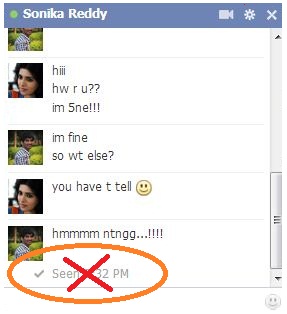
Facebook recently update new facility SEEN option in chat box.When you  are chating  with someone on Facebook, and the person read your message, it displays ‘seen’ along with the time when message was read.actually this is a best feature but some times it is problem to it allows your friend to know that your ignoring message from them when your not giving reply back.


Disable+Seen

In past you can just skip the conversation by not giving reply back or pretended as you dint saw the message but know this trick fails as soon as you saw the message it mark as read and it shows as
 'SEEN BY' or 'SEEN ON'. Many of my friends and other people asking can we disable seen option in facebook chat?
after my research i said it is possible by adding simple extension to your browser


How to Install FB Unseen:

FOR GOOGLE CHROME:


  • Just click here to get FB UNSEEN
  • As soon as you click above link you will be geting screen alert like below picture then just click ADD TO CHROME


fb+unseen

  • when you add this to chrome it get enabled and you can enjoy this feature.

FOR MOZILA FIRE FOX:


There are two ways in firefox to diasble seen option

Method 1:


Method 2:

  • Open your FIREFOX Browser and click CTRL+SHIFT+F
  • As soon as you click above code then yu will find screen capture like below
  • Then click on 1.CUSTOM FILTERS option then you can find an another option Add Filter Group.
  • When you click 2.Add filter group you can find New filter Group having an option Actions.
  • Click on 3.Actions then you can see Shoe/Hide filters.
  • Again click on Show/Hide filters
  • Then add below code in right side just like in picture below
/ajax/mercury/change_read_status.php$domain=facebook.com
Adblock+plus


For Other browers:

For any other browsers other than Mozila and chrome you just disable seen option by blocking below URL 

  • /ajax/mercury/change_read_status.php$domain=facebook.com


You can also use Chat Undetected: for GOOGLE CHROME,FIREFOX and INTERNET EXPLORER

click here to get CHAT UNDETECTED


HOW TO UNINSTALL ADD ONS:


In GOOGLE chrome: 


Just go to extensions and then make it as disable

uninstall+FB+UNSEEN

IN FIREFOX:

just like in CHROME here go to add on and uninstall the extenstion

chat+undetected


Saturday, May 11, 2013

Kaspersky Keys All version 10 May 2013


Kaspersky Keys All version 08 May 2013 | Kaspersky Pure And Kaspersky 2013 Activation Keys Kav And Kis | 3 MB

This Kaspersky Key Pack contain

1. Kaspersky Anti-Virus(KAV) 2013 and 2012 Activation Key File
2. Kaspersky Internet Security(KIS) 2013 and 2012 Activation Key File
3. How To Activate Kaspersky 2011,2012,2013